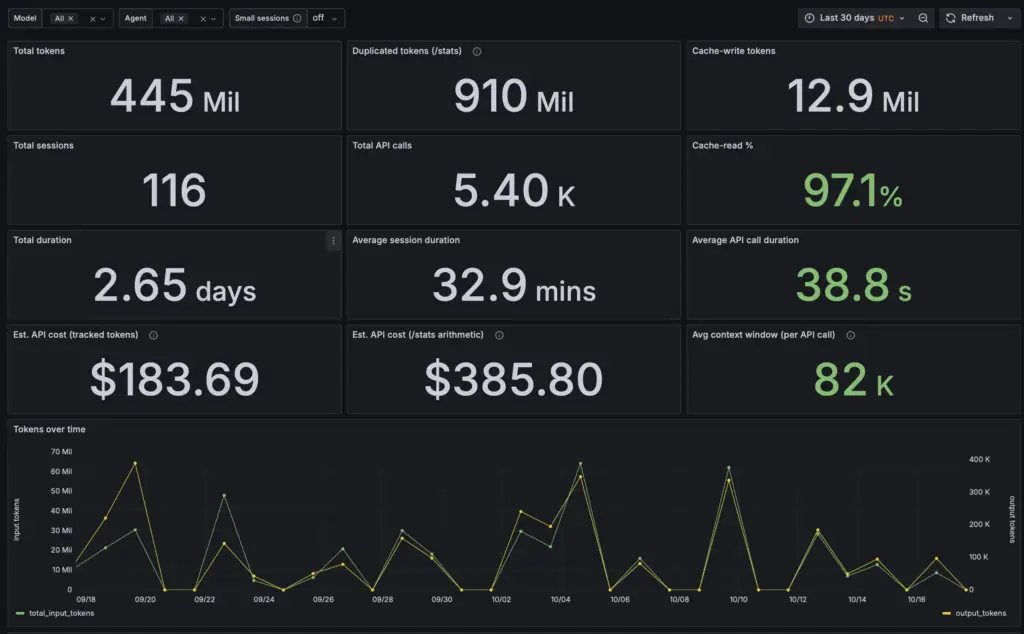
Claude Code Session Analytics (repository: analyze-claude-sessions) is a local tool. It reads the session transcripts that Claude Code writes to ~/.claude/projects, loads them into PostgreSQL, and shows different insights throughout four Grafana dashboards. The code is open source on GitHub.
Everything runs on your machine, using a Docker container. No data leaves the machine and you do not need an API key.
What it measures
Claude Code keeps a full record of each session in local .jsonl files, but it does not show you the per-call numbers. The tool gives you one database row per API call, sub-agent calls included, with:
- input, cache-write, cache-read and output tokens,
- the model, the agent type and the time between calls,
- an estimated cost at API list prices,
- the parent/child links between sessions (spawn chains).
On my machine, over three months (2026-07-18 to 2026-10-17), this is 46 projects, 655 sessions, 1,174 transcripts (519 of them sub-agents) and 25,678 API calls: 1.83 billion billed input tokens and 12.1 million output tokens. 96.74% of the input tokens were cache reads, and sub-agents used 23.9% of them.
How it works
- Discover. Walk
~/.claude/projects/**/*.jsonl: main session transcripts and the sub-agent transcripts under<session>/subagents/. - Report. A vendored shell report turns each transcript into a per-call CSV (tokens, timing, agent, model).
- Load. A Python CLI (
acp) loads the CSVs and the transcript metadata into theclaudeschema in PostgreSQL 17. Ingest is incremental: a grown file is read from the last byte offset. - Query. SQL views give the rollups: per transcript, session, project and day, the sub-agent share, cache efficiency, context growth, cost and lineage.
- Show. Grafana loads its datasource and four dashboards from files at start. You do not import anything.
- Export. Any table or view can go to Parquet through the
pg_parquetextension.
Stack: Docker Compose, PostgreSQL 17 with pg_parquet, Python 3.12 with uv, polars, psycopg and typer, Grafana. ruff, mypy and pytest check the code.
The four dashboards
- Usage overview — totals, two cost estimates, tokens and calls over time, cache efficiency, a session explorer and per-agent panels.
- Session detail — one session, call by call: tokens, cache-read %, context growth, time between calls.
- Session lineage — which session started which, from the
Origin session_id:marker in handoffs. - Multi-agent group sessions — one full spawn chain as one merged timeline.
How to use it
You need Docker and make. Then:
make env— writes.envwith your Claude projects directory,make build— builds the images (the first build compilespg_parquet, approximately 10–20 minutes),make upandmake ingest— start PostgreSQL and load your transcripts,make stats— print the headline numbers,make dashboard— open Grafana athttp://localhost:3000.
Grafana runs with anonymous access and no login, for single-user local use. Its port is bound to 127.0.0.1: do not expose it beyond localhost.
Optional features
Scheduled ingest (macOS). make install-timer installs a launchd agent that runs the ingest every 30 minutes. make uninstall-timer removes it. By default, ingest runs only when you run make ingest.